Rage Update 1-SKIDROW

Here’s scenegroup SKIDROW with the first update for the popular game RAGE.
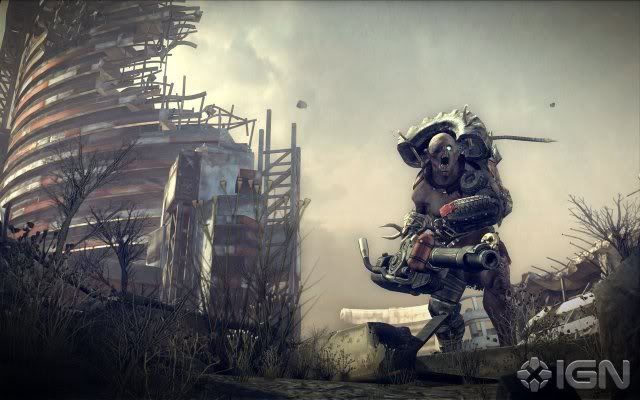
Description: Rage is a groundbreaking first-person shooter set in the not-too-distant future after an asteroid impacts Earth, leaving a ravaged world behind. You emerge into this vast wasteland to discover humanity working to rebuild itself against such forces as raider gangs, mutants, and the Authority — an oppressive government regime that has a special interest in you in particular.
Featuring intense first-person action, vehicle combat, an expansive world and jaw-dropping graphics powered by id’s revolutionary idTech 5 technology, Rage continues the legacy of design studio Id Software in delivering an experience like no other.
Publisher: Bethesda Softworks
Developer: Id Software
Genre: Action
Release Name: Rage.Update.1-SKIDROW
Size: 995.38 MB
http://www.fileserve.com/list/jT7WGSR
http://www.filesonic.com/file/2460577321
http://www.filesonic.com/file/2460555411/Rage.Update.1-SKIDROW.rar
http://www.wupload.com/file/346671843/Rage.Update.1-SKIDROW.rar
Rage Update 1 info:
RAGE Patch Release Notes - October 8th 2011
-------------------------------------------
RAGE defaults to lower video settings to allow the game to work on a
wide variety of hardware and software configurations.
Unfortunately, it is not possible to anticipate all possible graphics
driver issues in combination with unique end user hardware and software
configurations. For this reason RAGE does not automatically increase
video/graphics settings as this could result in negative side effects
on specific hardware and software configurations. The original release
of RAGE does not expose many video/graphics options for people to tweak
because some of these settings, although desirable from a quality
perspective, simply will not work on specific configurations either due
to hardware limitations and/or driver bugs. Due to popular demand for
more video and graphics options, this patch updates the video settings
menu and exposes several quality and performance settings. However, not
everyone may be able to increase the settings due to hardware limitations
and/or driver bugs.
VSync
-----
The new "VSync" option in the video settings menu allows you to remove
screen tearing. There are three options: ON, OFF and SMART.
When VSync is turned OFF you may experience screen tearing.
When VSync is turned ON you should not see screen tearing. However,
any time your frame rate drops below 60 frames per second you will
get a sudden more severe drop to 30 frames per second. This is how VSync
inherently works. If your computer cannot maintain 60 frames per
second and you miss the synchronization to the vertical retrace of
your monitor then you will miss a whole frame and synchronize to
the next frame instead.
Some graphics drivers now support a so called "swap-tear" extension.
You can try using this extension by setting VSync to SMART.
If your graphics driver supports this extension and you set VSync
to SMART then RAGE will synchronize to the vertical retrace of
your monitor when your computer is able to maintain 60 frames per
second and the screen may tear if your frame rate drops below 60 frames
per second. In other words the SMART VSync option trades a sudden drop
to 30 frames per second with occasional screen tearing. Occasional
screen tearing is usually considered less distracting than a more
severe drop in frame rate.
If your graphics driver does not support SMART VSync and you set VSync
to SMART in the video settings then RAGE will automatically fall back to
turning VSync OFF and you may experience screen tearing. The "swap-tear"
extension is brand new and may still present some issues on certain
graphics hardware. If you experience any problems using SMART Vsync
then set VSync to either ON or OFF. We are actively working with the
graphics hardware vendors to improve the "swap-tear" extension.
If changing VSync in the RAGE video settings menu does not appear to
make any difference then make sure you are not overriding the VSync
setting in the graphics vendor control panel. You can find the
graphics vendor control panel by right-clicking on the Windows desktop
and selecting the " control panel" option from the pop-up menu.
If you force VSync to the 'on' setting in the graphics vendor control
panel then you should not see any screen tearing in RAGE but you may
get a more severe drop in frame rate if your computer cannot maintain
60 frames per second.
If you force VSync to the 'off' setting in the graphics vendor control
panel then you may experience screen tearing no matter what setting you
use for the VSync option in the RAGE video settings menu.
Texture Cache
-------------
The new "Texture Cache" option in the video settings menu allows you
to increase the texture cache size to keep more texture data in
video memory.
If the Texture Cache is set to LARGE then RAGE will keep more texture
data in video memory. This may not only significantly reduce blurry
textures and texture popping, it will also allow complex scenes to be
rendered with more texture detail.
However, this may not work on computers that do not have enough system
or video memory, or you may experience a significant drop in performance.
If you experience issues due to hardware limitations you will have to set
the Texture Cache back to SMALL.
If after changing the Texture Cache to LARGE you experience a crash or
texture corruption (like a partially or completely blue world) then
the graphics driver may have run out of memory.
We are actively working with the graphics card vendors to resolve
any crashes.
If you do not experience a crash but you see texture corruption then you
may be able to get the large Texture Cache to work by accepting the change
and restarting the game. If you still experience texture corruption after
restarting the game you will have to set the Texture Cache back to SMALL.
You may also be able to improve the memory situation on your computer by
changing the Windows paging file management. Note that making changes to
the Windows paging file management may change the performance characteristics
of your computer. Any changes you make to your system configuration are
at your own risk. Always make backups of your system and revert these
changes if you notice undesirable side effects.
To change the paging file management on Windows Vista and Windows 7, first
press the "Start" button, then right-click on "Computer" and then select
"Properties" from the popup menu. Then select "Advanced system settings"
on the window that appears. Select the "Advanced" tab on the
"System Properties" window that is displayed and press the "Settings"
button under "Performance". Select the "Advanced" tab on the
"Performance Options" window that shows up next and press the
"Change..." button under "Virtual memory". Now uncheck the option
"Automatically manage paging file size for all drives" and make
sure that the option "System managed size" is selected on the
"Virtual Memory" window. Confirm the change by pressing the "OK" button
on each window. After making this change you will have to restart your
computer for the change to take effect.
To change the paging file management on Windows XP, first press the
"Start" button, then right-click on "My Computer" and then select
"Properties" from the popup menu. Select the "Advanced" tab on the
"System Properties" window that is displayed and press the "Settings"
button under "Performance". Select the "Advanced" tab on the
"Performance Options" window that shows up next and press the "Change"
button under "Virtual memory". Make sure that the option
"System managed size" is selected on the "Virtual Memory" window.
Confirm the change by pressing the "OK" button on each window.
After making this change you will have to restart your computer for
the change to take effect.
Anisotropic Filter
------------------
The new "Anisotropic Filter" option in the video settings menu allows
you to increase the anisotropic texture filtering.
Anisotropic filtering is a method to enhance the image quality of
textures on surfaces that are at oblique viewing angles.
The anisotropic texture filtering in RAGE defaults to a low value to
accommodate for low-end graphics hardware. However, the anisotropic
filtering can be increased for high-end graphics hardware by setting
the Anistropic Filter option to HIGH in the video settings menu.
Do not force anisotropic filtering to the ‘on’ setting in the graphics
vendor control panel because this may cause rendering artifacts in
the game.
Note that increasing the anisotropic filtering may improve the
texture quality while it may also decrease the frame rate.
Patch Changes / Fixes
---------------------
- Implemented workaround for AMD driver crash right after intro cinematic
on Win 7 32-bit systems.
- Disabled UBOs because they are causing animation issues with AMD drivers.
- Don't allow swap-tear to be enabled on AMD while the extension is not
exposed because it may crash.
- Support for new video settings: "texture cache", "vsync" and
"anisotropic filter"
- Automatically adjust vt_maxPPF based on the number of available cores.
- Improved performance for SLI cards when GPU transcode is enabled.
- Fix for GPU Transcoding option being disabled after exiting gameplay.
- Added safe mode to restore video settings to default values.
- Allow g_fov to be changed from the RAGE launch options in Steam.
- Server now forwards text chat from clients to all other clients while
in-game.
Known Graphical Issues
----------------------
The following issues were found using NVIDIA graphics hardware with
the GeForce R285 Driver or AMD graphics hardware with the AMD Catalyst
11.10 Version 2 Preview Driver.
- If you turn up both the screen resolution and anti-aliasing settings
to high values in the video settings menu and/or you enable
"GPU Transcode" then the screen may no longer update on some hardware
configurations. This means your system does not have the necessary
video memory to run with these high settings. You can re-enter the video
settings menu and lower your settings to restart screen updates.
- If you turn up both the screen resolution and anti-aliasing settings
to high values in the video settings menu you may experience a crash
if your system does not have the necessary memory to run with these
high settings. To avoid this problem you will have to re-enter the
video settings menu to lower the settings. If you can no longer launch
the game after changing the video settings to high values you can add
the following to your RAGE launch options in Steam:
+com_safemode 1
The launch options can be found by right-clicking on RAGE in Steam
and selecting "Properties". Then click on "Set Launch Options" in
the dialog that pops up. Adding this option will reset your video
settings to the default values the next time the game is launched.
When the game is launched in safe mode the game will show "safe mode"
in the corners of the screen. Do not forget to remove the safe mode
launch option after launching the game once to make sure you do not
lose your video settings each time you launch the game.
- Using a NVIDIA graphics card on Windows XP 32-bit or XP 64-bit, you
may experience a crash or hang when changing the screen resolution in
full screen mode or switching from windowed mode to full screen mode.
This has been identified as a graphics driver problem. We have spent
significant effort trying to work around this problem and were
successful in reducing the frequency of occurrence but a driver update
is necessary to completely fix the problem. We are actively working with
NVIDIA to make a solution to this problem available as soon as possible.
- Using an AMD graphics card, you may experience black flickering
artifacts on flags, banners and zip-lines if you run in full screen
mode. This has been identified as a graphics driver problem. We are
actively working with AMD on a solution to this problem.
- Using an AMD graphics card, you may experience black grid lines on
some graphical user interface (GUI) elements like the in-game mini-map.
This has been identified as a graphics driver problem. We are actively
working with AMD on a solution to this problem. If you find the grid
lines particularly distracting, you can add the following to the RAGE
launch options in Steam as a temporary workaround.
+vt_maxAniso 1
The launch options can be found by right-clicking on RAGE in Steam
and selecting "Properties". Then click on "Set Launch Options" in
the dialog that pops up. However, note that adding this setting will
lower the general texture quality in the game.
- If you have an AMD graphics card with a dual core CPU system you may
experience severe hitching and low frame rates. This has been
identified as a driver problem. We are actively working with AMD on
a solution to this problem. As a temporary workaround you may add the
following to the RAGE launch options in Steam:
+jobs_numThreads 0
The launch options can be found by right-clicking on RAGE in Steam
and selecting "Properties". Then click on "Set Launch Options" in
the dialog that pops up.
- If you are running RAGE in full-screen mode and you ALT-TAB to a
different application you may lose your VSync setting. When you
switch to a different application VSync stops functioning.
RAGE detects that VSync is no longer working and automatically switches
back to synchronizing to real-time to make sure the game time advances
in a consistent manner. We are actively working with the graphics
vendors on a solution to this problem.


 [RELEASE] Rage-SKIDROW

 OFFLINE