source: symbianize.com
Hello, in this thread I'm gonna show you on how to create a simple login/logout system with registration and display function
using Wamp Server [PHP as PL]
As we all know, login/logout and signup is very important in a system. The main purpose of
it is to secure the system and to recognize a specific user whether admin ba sya or just a
simple user lang who could only see limited areas of the system.
So, let's start!
Step 1:
Make sure you already installed Wamp Server. However, kahit anong tools or apps ang gamit
nyo parepareho lang din naman. Pero in this tutorial version, Wamp server ang ginamit ko
dito.
Step 2:
Go to drive C: -> wamp -> www
Then create a new folder. Dyan tayo mag se save ng mga php and html files later.
Step 3:
First let's create our database!
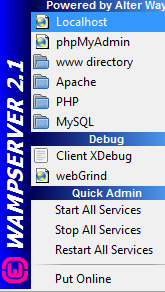
Go to system tray then click the wamp icon. then go to PHPmyAdmin
Step 4:
PHPmyAdmin will now appear in default browser, similarly to this...
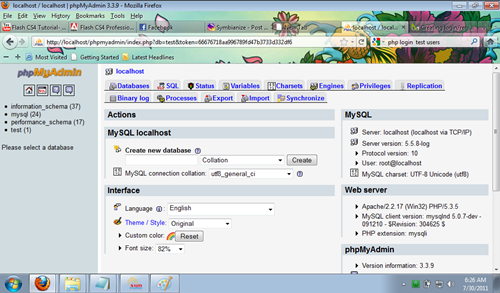
At this point, we will now create a new database.
Sa right side, may makikita kayo na Create a new database so just fill it up. In this
example, pinangalanan ko yung database na: logdb
Step 5:
Go inside the database then click SQL tapos copy and paste this one!
Code:
CREATE TABLE `logdb`.`users` (
`id` INT NOT NULL auto_increment ,
`name` VARCHAR( 20 ) NOT NULL ,
`password` VARCHAR( 20 ) NOT NULL ,
`location` VARCHAR( 50 ) NOT NULL,
`email` VARCHAR( 20 ) NOT NULL ,
PRIMARY KEY ( `id` )
)
Tapos you may also add a primary key sa email and name.
Well, that's optional.
For complete steps, please download this file
http://uploading.com/files/84358f5a/php%2Btutorial.doc/
 Mag-usap Tayo!
> Web Zone > HTML / Javascript / PHP / ASP.Net
Mag-usap Tayo!
> Web Zone > HTML / Javascript / PHP / ASP.Net [PHP TUTORIAL] Simple Login, Logout, Signup and Display Functions!

 OFFLINE
